CRM Help Docs
Home
CRM Help Docs
View Categories
Home
Docs
Websites
How to link Button with Page in website Builder?
How to link Button with Page in website Builder?
< 1 min read
Listen
0:00
/
0:16
1×
Copy page
Copy page
Copy this page as Markdown for LLMs
View as Markdown
Open this page as plain Markdown
(opens in a new tab)
Open in ChatGPT
Ask questions about this page
(opens in a new tab)
Open in Claude
Ask questions about this page
(opens in a new tab)
Open in Google AI Studio
Ask questions about this page (Google account required)
(opens in a new tab)
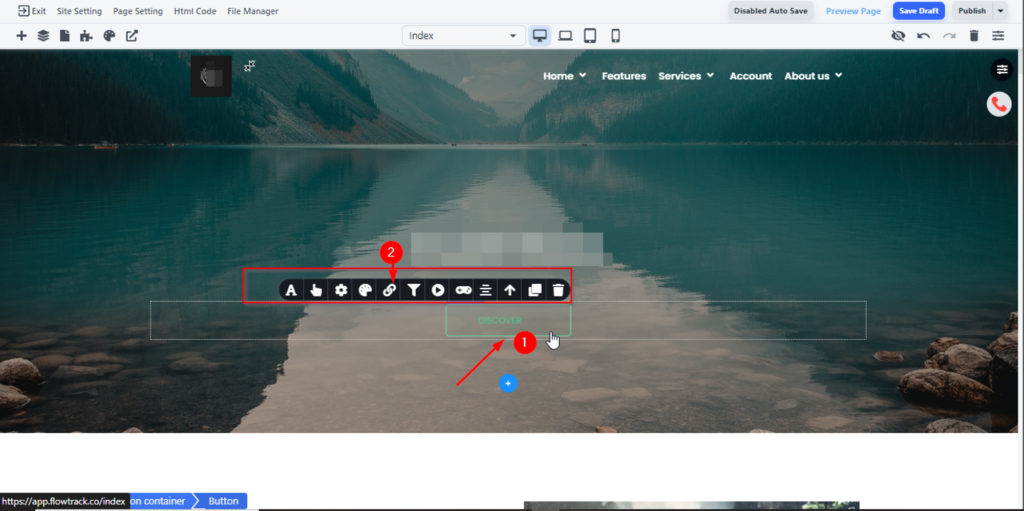
Click on Button, you will see the several options to edit your button
Click the Link option (which is 5 icon ) as shown below.
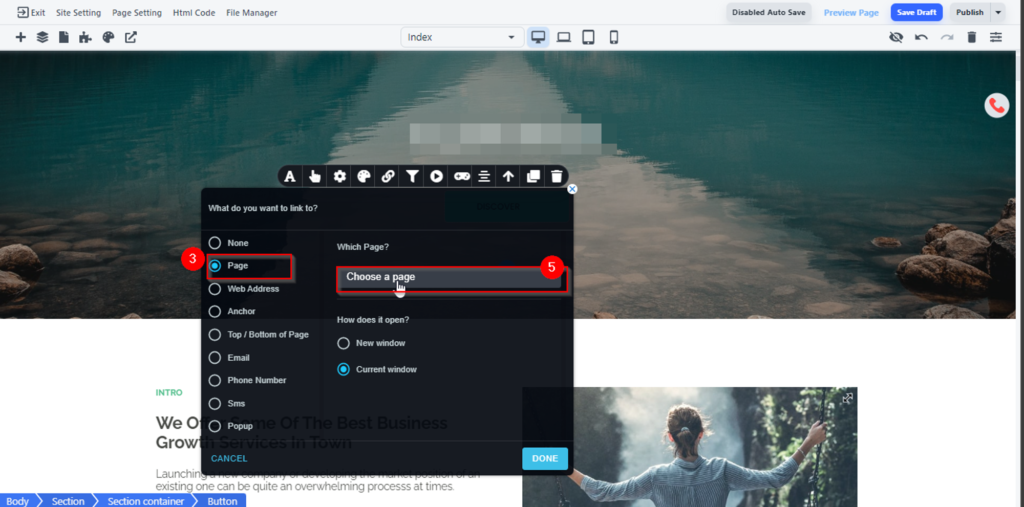
If you want to link the button with page click the page bullet and select the desire page you want to link as shown below:
How to display an image using website link on Facebook post? Meta Tags.
How can I clear my browser cache?